
Best overall: Wix for a small business that wants to update its own website. Best for long-term control: WordPress. Best for selling products online: Shopify. If you would rather have someone design, build, and host a custom site, Oakvera Digital offers that service; it is not a CMS platform.
- Wix is the best CMS platform for small business websites when easy self-editing matters most in 2026.
- Choose WordPress for more control over hosting, plugins, and future development.
- Choose Shopify when product sales, inventory, and checkout are central to the website.
- Oakvera Digital is a fit when you want a custom site built and hosted rather than managing a CMS yourself.
Why this matters
A content management system, or CMS, determines how you change your website after it launches. You use it to replace photos, edit service descriptions, publish pages, and keep basic business information current. The right choice is not the one with the longest feature list. It is the one you can keep accurate without making routine changes a project.
For a local service business, that often means clear service pages, location details, and a straightforward way for customers to get in touch. An online store has a different job: products, inventory, and checkout need to work together. In 2026, choose the CMS around the work the site must do every week, not a feature you might use someday.
The CMS is also only part of the decision. A platform can give you editing tools, but it does not write your service pages, choose a useful page structure, or keep business details correct. If you do not want to make those decisions alone, a website service is a separate option from a do-it-yourself platform.
What makes the best CMS for a small business website?
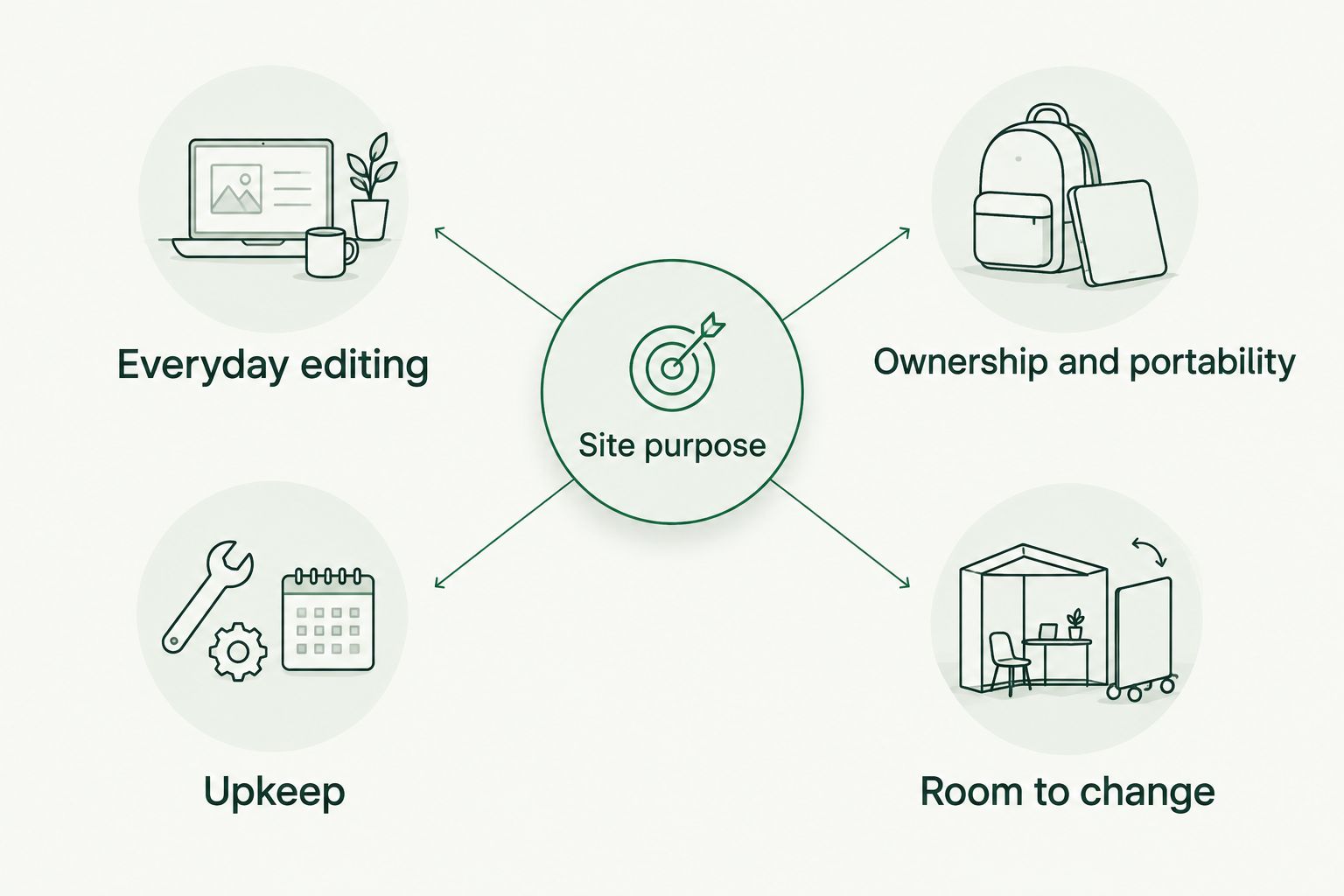
Use these criteria before comparing features. A platform that is easy for a designer to set up is not automatically easy for you to maintain.
- Everyday editing: Can you change text, photos, and business details without touching the layout?
- Site purpose: Does the platform fit a service site, a portfolio, or a store without making its main task awkward?
- Ownership and portability: What happens if you want a different host or a different way to build the site?
- Upkeep: Who handles hosting, software updates, and the parts that keep the site running?
- Room to change: Can the site grow without forcing you to rebuild routine pages?
These criteria pull in different directions. A hosted builder removes much of the technical upkeep but keeps you within its own system. Self-hosted WordPress gives you more hosting choice, but someone must manage updates and plugins. Pick the trade-off you can live with, not the longest list of tools.
Best CMS platforms at a glance
| Platform | Best for | Standout feature | Key limitation |
|---|---|---|---|
| Wix | Owners editing a small service site themselves | Hosted site builder with visual editing | Less portability than a self-hosted site |
| WordPress | Businesses that want long-term control | Choice of hosting, themes, and plugins | Updates and plugin upkeep need an owner |
| Shopify | Businesses selling products online | Storefront, products, and checkout in one system | Store tools add complexity to a simple service site |
| Squarespace | Businesses with image-led pages | Templates and page editing in a hosted platform | Less control over the underlying site than WordPress |
| Webflow | Teams that prioritize custom visual layouts | Detailed visual design controls and structured content | More to learn for routine site changes |
The table compares what each platform is built to make easier. It does not claim that one CMS will rank your business higher in search. Your page content, site structure, and upkeep still matter after you choose the software.
1. Wix: best CMS for owners who want to edit a service site
Wix is the default pick for a small business owner who plans to make routine website changes personally. It combines hosting, page building, and content editing in one platform. You can work on service descriptions and photos without arranging separate hosting or maintaining plugins.
That convenience has a boundary. Wix is a hosted platform, so moving a site to a different system is not the same as moving a self-hosted WordPress installation. Decide whether easy editing now matters more to you than flexibility if you rebuild later.
Wix pros:
- Visual editing keeps common page changes in one place.
- Hosting is part of the platform.
- It suits a straightforward site built around services and contact information.
Wix cons:
- You are working within Wix's platform rather than choosing your own host.
- A heavily customized site can make everyday editing less simple than the initial setup suggests.
Best for: A local business owner who will personally update a service-focused website.
Verdict: Buy if you want to own the editing task and keep technical upkeep out of your day. In 2026, Wix is the clearest default for that specific job, not a universal winner for every website.
2. WordPress: best CMS for long-term site control
WordPress is open-source software that you can run with a hosting provider you choose. Themes, plugins, and developer access give you more ways to shape a site than a closed website builder. That control is useful when your business needs a different page design, a new content structure, or a change in hosting.
More choice also means more decisions. WordPress software, themes, and plugins need attention over time. Before choosing it, name the person or service responsible for updates, backups, and fixing a problem when an added tool stops working.
WordPress pros:
- You can choose your hosting provider.
- Themes and plugins provide many ways to extend the site.
- You can bring in a developer without depending on one hosted builder's design system.
WordPress cons:
- Software and plugin maintenance need a clear owner.
- Adding plugins without a plan can make the site harder to manage.
Best for: A business that values hosting choice and expects its site to change substantially.
Verdict: Buy when you have someone accountable for maintenance. Hold if nobody has agreed to take that job; control is not helpful when routine upkeep is left undone.
3. Shopify: best CMS for a product-led online store
Shopify is built around selling. Product pages, inventory, and checkout are core parts of the platform rather than additions to a general service website. That makes it the strongest fit on this list when customers need to browse products and complete orders on the site.
A local business that mainly needs service descriptions and enquiries should not choose a store platform just in case it sells something later. Extra store settings still need attention, even when the business is not using them. Start with the site's main job.
Shopify pros:
- Products and checkout live within the same platform.
- Store content and order-related tasks have dedicated tools.
- It gives an online seller a clear place to manage its catalog.
Shopify cons:
- Store administration is unnecessary work for a service-only site.
- Custom content layouts require planning alongside the store structure.
Best for: A small business whose website's main task is selling products online.
Verdict: Buy for a product-led store. Skip it for a service site that only needs to explain what you do and help customers contact you.
4. Squarespace: best CMS for an image-led business site
Squarespace combines hosting, templates, and page editing. It fits a business that wants photos and project work to carry much of the page. You still need to write clear service information and keep contact details current; a polished template does not do those jobs for you.
Squarespace asks you to build within its system. That can keep the editing process contained, but it offers less control over hosting and the underlying setup than self-hosted WordPress. If you expect unusual site functions, define them before committing to a template.
Squarespace pros:
- Templates give image-led pages a starting structure.
- Hosting and editing sit in one platform.
- It fits sites where showing work is central to the sales conversation.
Squarespace cons:
- You cannot choose an independent host for the same Squarespace site.
- A template is not a substitute for custom site requirements.
Best for: A business that needs an image-led portfolio alongside basic service information.
Verdict: Buy if presenting your work is the main job and the platform's editing approach suits you. Hold if your required site functions do not fit the structure you plan to use.
5. Webflow: best CMS for detailed visual control
Webflow provides visual design tools and structured content collections. It gives a designer detailed control over layouts while leaving repeatable content in fields that can be edited. That combination suits a business with distinct page designs and a clear plan for who will maintain the content.
The extra design control does not automatically make Webflow the easiest CMS for an owner to learn. Ask to see how you will change a service page, add an image, and update repeated information. The answer matters more than how flexible the design tools look during a demonstration.
Webflow pros:
- Visual design controls support detailed page layouts.
- Structured collections help organize repeatable content.
- It separates some routine content edits from layout design.
Webflow cons:
- Its design tools take more learning than a basic page editor.
- Routine changes need a content structure that makes sense to the person editing them.
Best for: A business working with a designer on a distinctive site with repeatable content.
Verdict: Hold until you have seen your own editing tasks demonstrated. Buy when the layout control serves a clear need and the person maintaining the site is comfortable with the workflow.
How these platforms were ranked
The ranking puts the most common small service-site task first: keeping pages accurate without taking on technical maintenance. It then separates other jobs that need a different answer: controlling the hosting and software, selling products, showing visual work, and building detailed layouts. Each pick has a distinct best for use case; a store and a service site should not have the same default CMS.
The order is not a performance test or a promise about search rankings. It is a decision based on what the platforms are built to do and what you must maintain after launch. Use your actual editing tasks to check the pick before you commit.
Which CMS should you choose in 2026?
Choose Wix if you run a small service business and want to make your own text and photo changes. Choose WordPress if control over hosting and future development matters enough to take responsibility for maintenance. Choose Shopify when online product sales are the main purpose of the site.
Choose Squarespace when showing visual work is central to how customers decide. Choose Webflow when detailed page design matters and you have a clear editing workflow. If none of those editing jobs belongs on your desk, do not mistake a CMS subscription for a finished website.
Oakvera Digital is a separate choice for small and local businesses that want a custom site designed, built, and hosted at flat prices. It serves businesses in Victoria and Corpus Christi, Texas, and the Salt Lake City, Utah area. Oakvera Digital is best for an owner who wants a custom business website handled as a service rather than choosing and managing a CMS alone.
Talk through your website needs
Ask about a custom site built and hosted for your small business.
FAQ
What is the best CMS platform for a small business website in 2026?
Wix is the best default for a small service business owner who wants to edit the site personally in 2026. Choose a different platform when selling products, controlling hosting, or building detailed layouts is the main job.
Is Wix or WordPress better for a small business?
Wix is better for straightforward self-editing with hosting in one platform; WordPress is better for hosting choice and site control. WordPress also needs someone to manage software and plugin upkeep.
Should a local service business use Shopify?
A local service business should use Shopify when selling products online is central to the website. If the site mainly explains services and collects enquiries, store administration adds work without serving that main task.
Is Squarespace better than Wix for a portfolio?
Squarespace is a strong fit when presenting photos and projects is the site's main job. Wix is the simpler default here for an owner focused on editing a small service site; test the editing tasks that matter to you in either platform.
Is Webflow easy for a business owner to update?
Webflow can support routine content edits when the site is set up with clear fields for those changes. Ask to see how you will update your own service descriptions and images before choosing it.
Do I need WordPress to rank in Google?
No, you do not need WordPress to rank in Google. Choose a CMS you can use to keep useful pages, accurate business information, and a clear site structure up to date.
Can Oakvera Digital help if I do not want to manage a CMS?
Oakvera Digital designs, builds, and hosts custom websites for small and local businesses. It is a website service, not another CMS platform in this ranking.
One last thing
Before you choose a CMS in 2026, ask whoever will build the site to show you how to change a service description. Then ask who fixes the site if an update causes a problem. The best CMS is the one whose editing and upkeep have a named owner. If you want those tasks handled as part of a custom website service, Oakvera Digital is a different route from building it yourself.